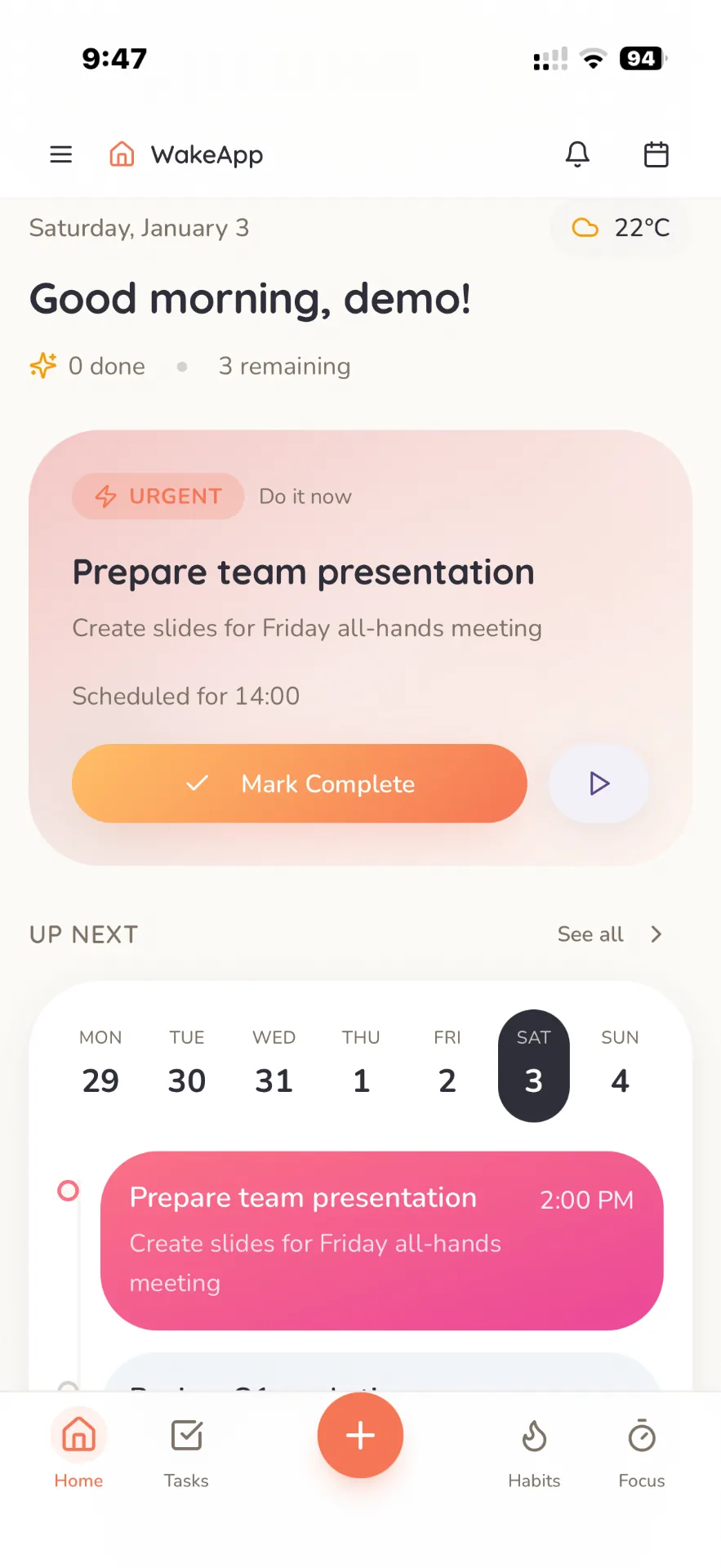
A quick tour of a real day in Wake-App. Tap a step to jump to it.
1
Start with today
Your home screen shows the next thing to finish, what is coming up and today’s weather. Mark it done or start a focus session right from the card.
2
Capture and organise tasks
Tap + to add a task with a priority, due date, subtasks and notes. Filter by Today, Upcoming or Overdue and drag sticky notes into the order you will do them.
3
Build morning and evening routines
Put habits into a morning or evening routine, check them off step by step and watch your streak grow.
4
Focus without distractions
Pick a task and start a Pomodoro session. Calm mode hides everything but the timer, and breaks are timed for you.
5
See your day on the calendar
Drag tasks onto the day to block time, drag them again to reschedule, and switch between day, week and month views.
Everything you need to plan, focus and follow through
Wake-App replaces the to-do list, habit tracker, timer and planner you juggle today.
Tasks that fit how you think
Capture everything, then see only what matters now.
Four priority levels and due dates, with Today, Upcoming and Overdue filters
List, sticky-note and Kanban views with drag to reorder
Subtasks, checklists, rich-text notes, comments and file attachments
An Eisenhower matrix that separates urgent from important
Calendar and time blocking
Give every task a time, not just a date.
Day, week, timeline and month views
Drag tasks from the sidebar onto the day, and drag again to reschedule
Your routines appear as blocks, next to all-day events and daily notes
See your Google Calendar events beside your plan (Premium, read-only)
Habits and routines
Small daily steps that add up.
Yes/no, count or time-based habits on the days you choose
Morning and evening routines you can walk through step by step
Streaks, a habit calendar and small celebrations when you finish
Focus timer
Pomodoro sessions linked to real work.
Adjustable work, short-break and long-break lengths
Link a session to the task you are working on
Calm fullscreen mode and a floating mini timer
Session history, so you can see where your time went
Projects and teamwork
Plan bigger work alone or with others.
Grid, list, Kanban and timeline views for each project
Invite people by link or email and assign tasks
Comments with @mentions, and changes that show up live for everyone
Notes and journal
A notebook that lives next to your plan.
Paper-style pages you can type on and draw over with pen, highlighter and shapes
Voice recordings, photos and checklists inside notes
Diary entries with mood and energy, plus freeform whiteboards
Roles, goals and reflection
Connect today’s tasks to the bigger picture.
Goals with target dates under each role in your life
Link tasks to a goal and see them on your home screen
A daily reflection for mood, energy, wins and gratitude
Insights
Learn how you actually work.
Weekly progress, a focus heatmap and streaks
Week-over-week comparisons and your reflection history
AI coaching insights with Premium
Rewards that make progress fun
Finishing tasks pays off, literally.
Every completed task earns in-app cash, from $50 to $400 by priority (virtual money)
Spend it on houses and cars in the shop
Step inside your house in 3D, decorate it and park your car in the garage
See where you rank on the leaderboard
Works wherever you are
Your plan on every screen, online or not.
Home-screen widgets on iPhone: Today, Timeline, Sticky Tasks and Matrix
Keeps working offline and syncs when you are back online
Import from TickTick or any CSV or JSON file, and export everything
Install the web app on any computer or phone
Get Wake-App
One account, synced everywhere you sign in.
iPhone and iPad
The full app with home-screen widgets, from the App Store.
Up to 5 open tasks, 3 projects and 3 active habits
Share a project with one other person
Calendar, focus timer, notes, insights and rewards
Premium
$4.99per month, or $29.99 per year
Unlimited tasks, projects, habits and collaborators
AI coaching insights
Google Calendar events in your planner (read-only)
The yearly plan and its 7-day free trial are available in the iPhone app.
Questions and answers
Is Wake-App free?
Yes. The free plan covers up to 5 open tasks, 3 projects and 3 active habits, plus the calendar, focus timer, notes, insights and rewards. Premium ($4.99 a month or $29.99 a year) removes the limits and adds AI coaching insights and your Google Calendar events.
Which devices can I use it on?
iPhone and iPad through the App Store, and any modern browser at wake-app.pro, which you can install like an app. An Android app is in testing and coming to Google Play.
Does it work offline?
Yes. Wake-App keeps your recent data on your device and saves the changes you make offline, then syncs them when you reconnect. Signing in, file uploads, purchases and AI insights need a connection.
Can I plan with other people?
Yes. Share a project by link or email, assign tasks and comment with @mentions. On the free plan a project can have one other person; Premium removes the limit.
Does it connect to Google Calendar?
With Premium, your Google Calendar events appear next to your tasks and routines. Wake-App only reads your calendar and never changes it.
Can I bring my tasks from another app?
Yes. Import a TickTick export or any CSV or JSON file, and export all of your data as JSON or CSV whenever you like.
What are the cash, houses and cars?
Completing tasks earns in-app cash. It is virtual money, not real money. Spend it on houses and cars, step inside your house in 3D and decorate it, and see where you rank on the leaderboard.
How do I delete my account?
Open Settings in the app and choose Delete account, or follow the steps at wake-app.pro/delete-account. Your account and its data are deleted for good.
Start your first clear day
Setting up takes a minute. Free to start, no credit card needed.